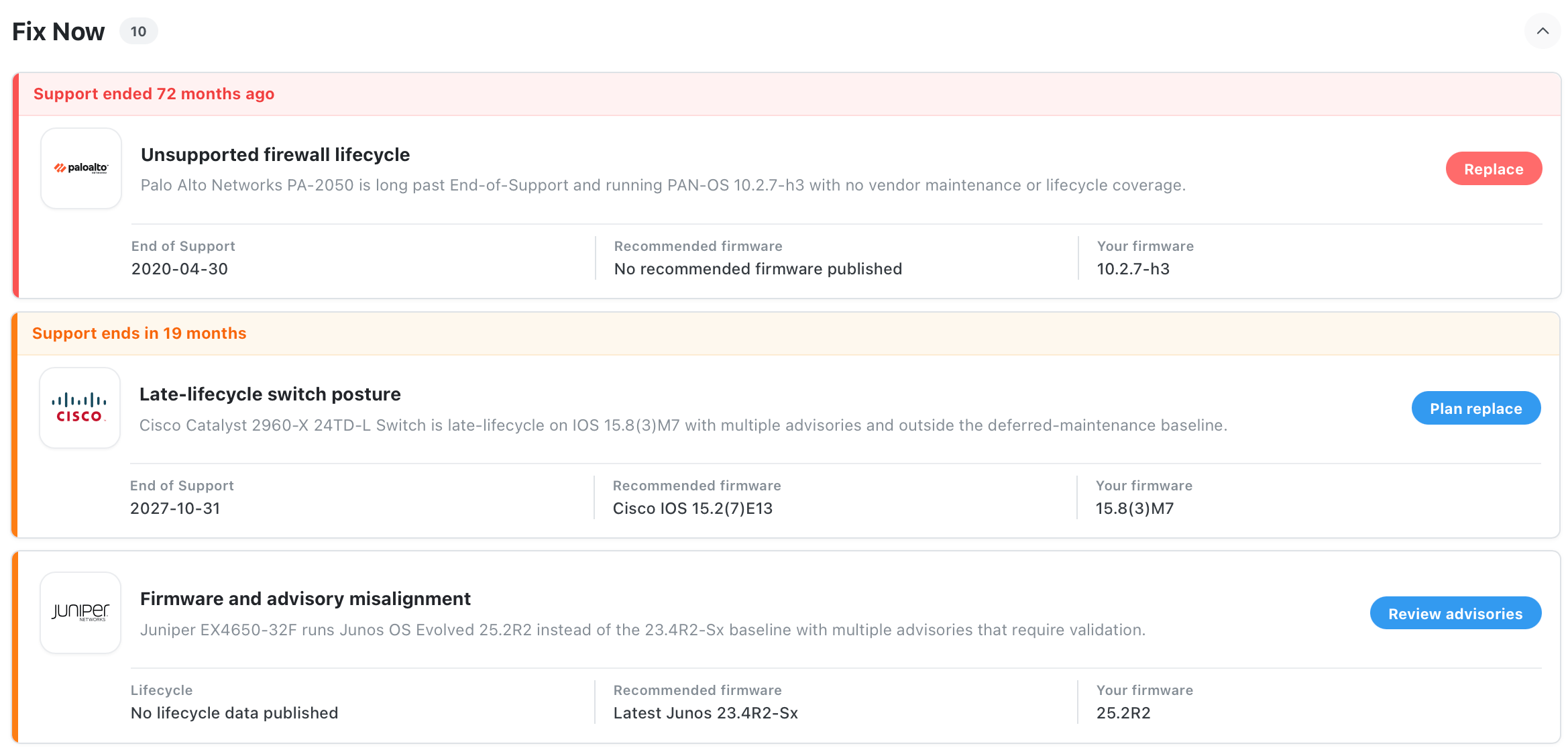
VendorFox maps lifecycle, firmware, and security advisories directly to the hardware you actually run - giving MSPs and IT teams a clear, trusted view of what matters and what to do next.
No agents. No scanners. No friction.
1
MSPs & Service Providers
Manage hundreds of customer estates with confidence and without guesswork. VendorFox provides a live, vendor-verified view of hardware lifecycle, firmware risk, and support status across every client environment. This creates clear visibility into where risk is emerging and what requires action, enabling credible audits, stronger QBRs, and fewer surprises when unsupported infrastructure becomes your liability.
2
IT Operations Teams
Gain a single, authoritative view of where infrastructure risk truly sits. VendorFox cuts through vendor noise and stale inventories to highlight what matters now, what is approaching risk, and what action is required across hardware supportability, firmware posture, and platform stability. The result is better planning, fewer last-minute escalations, and technology decisions driven by insight rather than firefighting.
3
Security & Compliance Teams
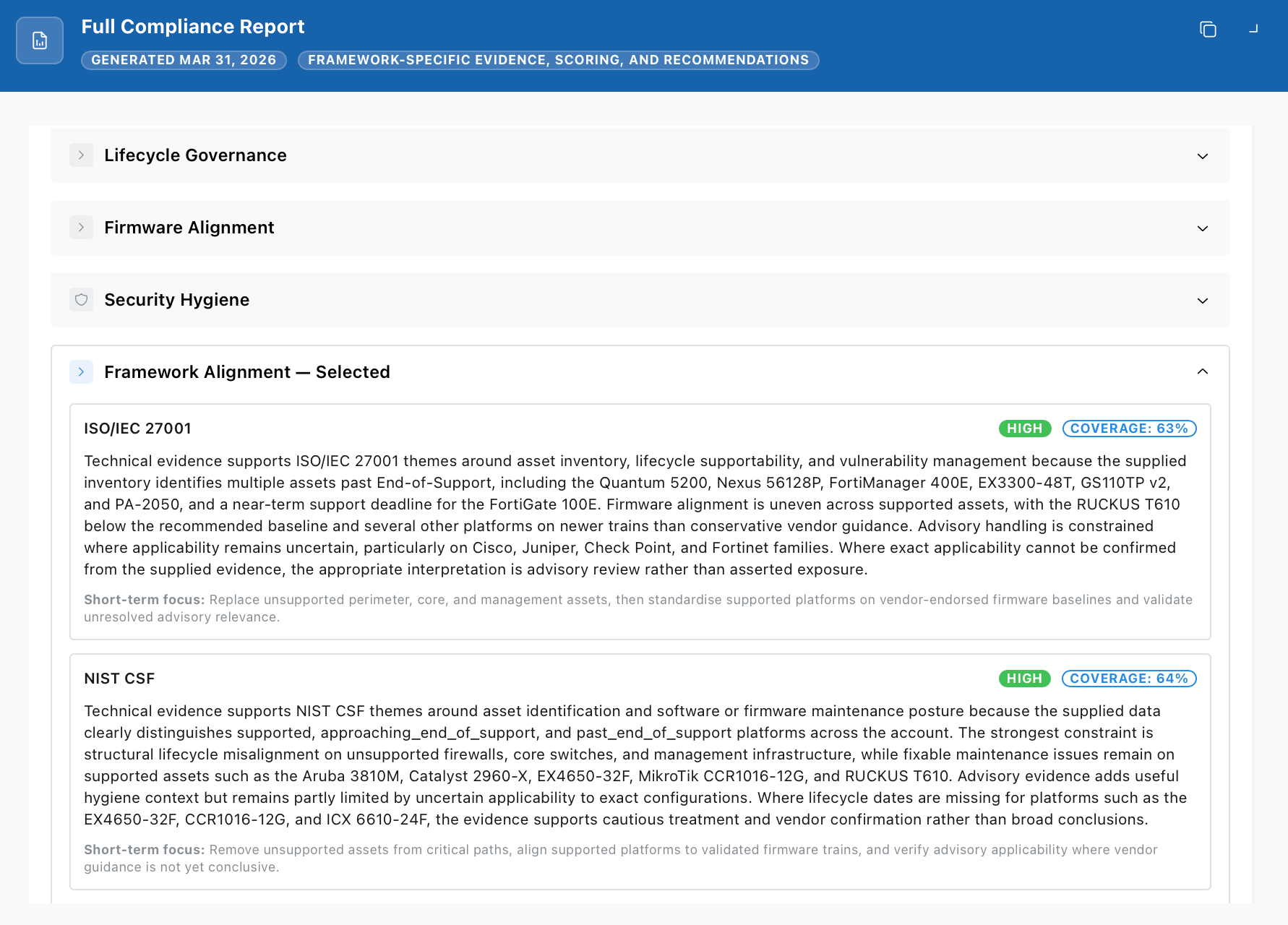
Move from theoretical compliance to provable control. VendorFox links real infrastructure data to lifecycle exposure, firmware currency, and security advisories, allowing you to evidence risk ownership, prioritise remediation, and brief boards with confidence. It supports frameworks such as ISO 27001, NIST CSF, and NCSC by showing how policy maps to operational reality, not how it is assumed to on paper.
From model-level lifecycle status, firmware recommendations, security advisories and real-world insights - through to estate-wide compliance mapping, lifecycle reporting and CTO / CISO briefings - all tailored to the exact infrastructure you actually run.

Features
Unified, live view of your hardware estate across all vendors and models
Vendor lifecycle milestones mapped to the exact SKUs you run
Firmware status and support gaps highlighted automatically
Vendor-approved upgrade paths that avoid known bugs and dead-end versions
CVEs mapped to your actual hardware models and running firmware
Vendor advisories filtered to only what applies to your estate
Plain-English summaries instead of raw CVE and vendor advisory noise
Targeted CISO and CTO summaries focused on risk, exposure, and decisions
Early visibility of upcoming End-of-Life and End-of-Support milestones
Recommended replacement options and upgrade paths
See when too much of your estate is clustered around the same lifecycle risk window.
Clear replacement timelines so nothing reaches EoL by surprise
One-click generation of regular or ad-hoc reports aligned to audit and compliance needs
Export QBR, CAB, and audit-ready summaries instantly
Live dashboards showing support, security, and compliance risk - not static spreadsheets
Multi-tenant views for MSPs managing multiple customers, estates, and regulatory contexts
Vendors we track
Get the full picture of your vendor lifecycle and risks without touching your network, installing agents, or compromising control.
We’ve lived the pain: bloated CMDBs, agent sprawl, and digging through endless PDFs just to answer, “Is this still supported?”
VendorFox continuously ingests and normalises thousands of vendor data points: firmware bundles, EoL notices, CVEs, advisories - then maps them cleanly to your infrastructure. You only see the data that applies to your hardware, nothing else.

VendorFox isn’t an opinion engine — it’s a continuously normalised view of official vendor data, mapped to your infrastructure.

Major Infrastructure Vendors
Normalised into a single, consistent intelligence layer.

Hardware Models Unified
Disparate SKUs, families and lifecycle policies mapped to one schema.
Vendor Advisories Interpreted
Raw notices reduced to estate-specific, actionable risk.
Networking & OT Infrastructure
Focused on what actually runs in production.
Testimonials
We cut 10+ hours a month chasing vendor PDFs. VendorFox gives us lifecycle and firmware clarity instantly.
CTO
Higher Education
We discovered 15 unsupported devices we didn’t know about – it gave us a roadmap we could action immediately.
Infrastructure Engineer
Financial Services
Having CVEs mapped directly to our estate is a game changer – our board finally sees the real risk posture.
Security Architect
Defence
VendorFox automatically discovered dozens of EoL models and unsupported firmware across our existing inventory, without scanning a single device.
IT Manager
Healthcare
VendorFox has streamlined our compliance reporting. What used to take days of manual work is now done in a few clicks. It's a massive time-saver for our team.
Compliance Officer
Insurance
The ability to track firmware versions and get notified about updates is invaluable. We've been able to prevent several critical vulnerabilities from affecting our systems.
Systems Administrator
Retail
Our procurement team loves VendorFox. They can now easily access lifecycle information for all our hardware, which helps in budget planning and refresh cycles.
Procurement Specialist
Manufacturing
The user interface is so intuitive. We were able to get up and running in no time, and the team needed minimal training to start getting value from the platform.
Director of IT
Logistics
VendorFox's reporting capabilities have given us unprecedented visibility into our hardware assets. We can now generate detailed reports for management with ease.
Network Engineer
Telecommunications
Main features | Free | Professional | Team | Enterprise Scale |
|---|---|---|---|---|
Device Type Limit | 2 | 20 | 50 | Unlimited |
Unified Inventory Panel | ||||
Security Alerts & CVE Tracking | ||||
Lifecycle Warnings | ||||
Snapshot Reports | ||||
Compliance Checker | ||||
Continuous Monitoring | - | |||
Commercial Opportunities | - | - | ||
SSO (Single Sign‑On) | - | - | ||
System Integrations | - | - | Single CMDB integration | Multiple integrations (CMDBs / Teams / Slack) |
Multi-Customer Dashboards | - | - | - | |
Customised Branding | - | - | - | |
Free
Device Type Limit | 2 |
Unified Inventory Panel | |
Security Alerts & CVE Tracking | |
Lifecycle Warnings | |
Snapshot Reports | |
Compliance Checker | |
Continuous Monitoring | - |
Commercial Opportunities | - |
SSO (Single Sign‑On) | - |
System Integrations | - |
Multi-Customer Dashboards | - |
Customised Branding | - |
Professional
Device Type Limit | 20 |
Unified Inventory Panel | |
Security Alerts & CVE Tracking | |
Lifecycle Warnings | |
Snapshot Reports | |
Compliance Checker | |
Continuous Monitoring | |
Commercial Opportunities | - |
SSO (Single Sign‑On) | - |
System Integrations | - |
Multi-Customer Dashboards | - |
Customised Branding | - |
Team
Device Type Limit | 50 |
Unified Inventory Panel | |
Security Alerts & CVE Tracking | |
Lifecycle Warnings | |
Snapshot Reports | |
Compliance Checker | |
Continuous Monitoring | |
Commercial Opportunities | |
SSO (Single Sign‑On) | |
System Integrations | Single CMDB integration |
Multi-Customer Dashboards | - |
Customised Branding | - |
Enterprise Scale
Device Type Limit | Unlimited |
Unified Inventory Panel | |
Security Alerts & CVE Tracking | |
Lifecycle Warnings | |
Snapshot Reports | |
Compliance Checker | |
Continuous Monitoring | |
Commercial Opportunities | |
SSO (Single Sign‑On) | |
System Integrations | Multiple integrations (CMDBs / Teams / Slack) |
Multi-Customer Dashboards | |
Customised Branding |
Start small, prove the value, and scale only when it earns its place in your organisation.
Monthly
Yearly
Free
Explore with no commitment.
$0
Professional
For individual IT professionals and small teams.
$99
Team
For growing IT teams and MSPs.
$250
Enterprise Scale
For organisations and MSPs operating at scale.
Custom
One-Off Estate Audit
For a fixed $999, we run your infrastructure through the full VendorFox intelligence layer — lifecycle, firmware alignment, relevant advisories and estate-wide risk posture — and deliver a structured, point-in-time report.
Full EoL / EoS mapping across all in-scope hardware
Firmware alignment assessed against vendor guidance
Security advisories filtered to what actually applies
Estate-wide risk posture with prioritised remediation plan
Alignment view against ISO 27001, NIST CSF, CIS Controls and NCSC guidance
Lifecycle exposure across production infrastructure
Supportability risk across critical process environments
Firmware stability guidance in operational context
Risk clustering across critical lifecycle windows
Alignment insight against ISA/IEC 62443 and NIS2 obligations
Lifecycle risk view per client estate — so you know exactly what is drifting into unsupported status
Highlights where commercial opportunities sit within each client’s lifecycle position (renewals, upgrades, replacements)
Identify which clients are sitting on imminent EoL/EoS risk windows — before it becomes an incident or an SLA problem
Prioritised commercial talking points for QBRs: what to do, why now, and the likely impact of delaying
Compliance posture framing per client (ISO 27001, NIST CSF, NCSC, NIS2 / sector context) to support risk-led recommendations
If you move to an annual VendorFox subscription within 30 days of receiving your report, we credit the full $999 against your first year.
No agents. No scanning. No consultancy theatre. Just a clear view of where you stand — and what to do next.
We've answered the most frequent of those frequent questions below.
VendorFox supports a wide range of major networking, security, and industrial networking / OT vendors — including many lesser-known manufacturers that are commonly missed by mainstream tooling. New vendors and models are added continuously, and you can request additions during onboarding.
Yes. VendorFox covers industrial networking and OT-adjacent infrastructure (alongside traditional IT), including “long tail” vendors. The goal is the same: lifecycle clarity, firmware guidance, and relevant security exposure across mixed estates.
Vendor tools work well if you only run one vendor — but most estates are multi-vendor. Those portals tend to be siloed, inconsistent, and time-consuming to interpret at scale. VendorFox gives you a clean, vendor-neutral view across your whole estate, highlighting lifecycle drift, firmware currency, and relevant security exposure without you having to chase it across dozens of sources.
No. VendorFox does not scan your network, collect live telemetry, or replace monitoring or security tools. It provides lifecycle, firmware, and advisory intelligence across your estate — helping you understand risk, prioritise action, and plan remediation using the data you already have.
No — VendorFox works for estates of any size, from small multi-vendor environments to large, complex enterprises and MSP portfolios.
Yes. VendorFox supports MSP-style client views so you can track and report per customer, keeping each client’s inventory and outputs logically separated.
No. VendorFox is fully cloud-native — no agents, no scanning, no credentials, no SNMP, and no direct device access. You provide your model and (optionally) firmware details, and we handle the rest. Optional integrations connect to your ITSM/CMDB/workflow tools — not your devices.
Minimum: device model.
Recommended (optional): firmware version, quantity, and price paid.
Firmware is the most important. The more precise your firmware version, the more precise our guidance — especially for security advisory matching and “is this affected?” analysis.
Ideally provide the full version (e.g. 1.2.3). If you only know the major/minor train (e.g. 1.2.x), we can still provide lifecycle and general firmware guidance, but security matching may be limited. If no firmware is provided, we’ll still track lifecycle and high-level risk, but we can’t reliably map advisories to your exact exposure.
No. VendorFox only needs your model and (optionally) firmware details — you stay in control, and no private configuration data is required.
Request it during onboarding — we’ll prioritise it and typically add it within a few business days (urgent requests can be prioritised).
We continuously monitor official vendor sources (e.g. lifecycle notices, firmware release information, security advisories) alongside public vulnerability sources, so you don’t have to.
We prioritise vendor-published source material for lifecycle, firmware, and advisory facts, and we link guidance back to the underlying vendor references wherever possible. Where information is ambiguous, we make the uncertainty explicit so teams can validate via normal change control and vendor support processes.
Data is refreshed weekly by default, and can also update on demand when you add devices or make changes to your inventory.
Yes — VendorFox keeps a full audit trail of results over time, so you can see how lifecycle dates, firmware guidance, and advisory mappings have changed.
Community insights reflect real engineer discussions across trusted technical forums and are clearly labelled as non-official operational context. They are curated to highlight credible, firsthand learnings (e.g. upgrade gotchas, stability notes) and should be validated against your own testing and change control.
Yes — VendorFox does not require IP addresses, hostnames, serial numbers, or sensitive configuration data. We only need minimal infrastructure metadata (model and, optionally, firmware) to generate guidance.
No — VendorFox does not require your vendor portal credentials.
We store minimal personal info (name, email, sector) plus infrastructure metadata (model, firmware). Data is encrypted in transit and at rest, with role-based access controls and audit logging.
No. Any benchmarking is anonymised and aggregated within the VendorFox platform — never sold or attributed to individual customers.
All data is stored in secure, region-specific cloud infrastructure.
Yes — and we can provide a Data Processing Agreement (DPA) for Enterprise customers.
VendorFox does not replace formal certification or governance processes. Instead, it provides evidence and operational inputs (supportability, firmware currency, known security exposure) that help teams demonstrate and maintain good practice within frameworks such as ISO 27001, NIST CSF, and UK NCSC-aligned governance.
VendorFox provides guidance based on published information and observed trends, but it does not replace change control, testing, or vendor support processes. All recommendations should be validated within your own environment.
A device type refers to a specific hardware model — for example, a Cisco Catalyst 9300-48P Switch counts as one device type. You can have any number of those in your environment, but we charge for the unique types you track, not the number of physical units.
Yes — you can upgrade or downgrade from your account settings. Upgrades take effect immediately; downgrades take effect at the end of your billing cycle.
You’ll be prompted to upgrade your plan to keep tracking everything and to continue receiving alerts. You can remove device types to make space, but upgrading is the quickest route.
Team plans include a single CMDB API connection to one supported platform (SolarWinds Service Desk, Freshservice, HaloPSA and NinjaOne).
Enterprise can support additional and bespoke integrations (CMDB, ITSM, collaboration platforms, and more). If you need something not covered by Team, contact us for a custom Enterprise plan.
Yes — for Pro plans and above, you can configure alert notifications via email.
Yes — you can export your device inventory, alerts, and benchmarking outputs from your dashboard.
Yes — you can export a client-ready report as a PDF, suitable for sharing with stakeholders or customers.
Yes — we offer partner/reseller options for MSPs. Contact us to discuss the best-fit commercial model for your client portfolio.